
There has never been a better time in history to be a creative person: a composer, a musician, a content creator, or a communicator. Not only because of the interconnected world we live in, but also because the gear to make it happen is easier to use and more affordable than ever.
Hey, I know; it’s like a jungle out there. Every brand claims they’re the thing you should be looking at and pushing their products on your nose every time you open an app. Well, you’re in the right place. I’ve narrowed it down to only the best in the market right now.
Top 3 - Mac Audio Interfaces
Preview | Product | Price |
|---|---|---|
 | ||
 | ||
 |
I’m sure one of the following audio interfaces will be your next favorite companion.
Let’s go!
Best Mac / Apple Silicon-friendly Audio Interfaces
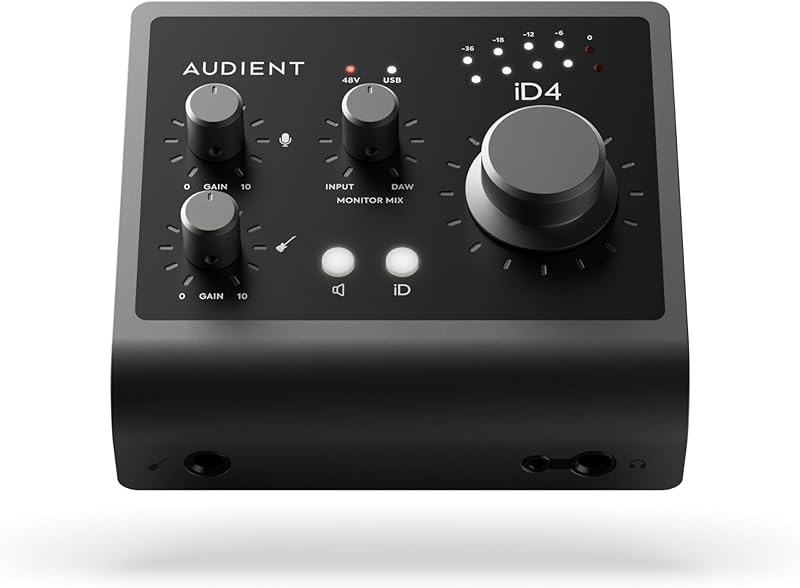
1. Audient iD4 MKII
The first thing I’m going to say about the iD4 MKII is that it looks and feels great. The all-new, all-metal housing is sleek and durable, feeling like something you can take on the road, and that would also look amazing sitting on your desktop.
I guess the feature I liked the most was the knob that blends the mix coming from the DAW and the direct monitor. I’ve always struggled with interfaces like this to make myself heard when I’m singing. I end up cranking the microphone’s gain, and we all know what happens when you do that.
With the iD4, you just have to turn the knob toward the monitor, and you’ll have more of you than the band playing (or whatever you’re singing over).
I tried this with a condenser and a dynamic microphone, and the results were impeccable in both scenarios.
I also liked the preamps a lot. The vocal preamp (found in the XLR input) comes straight from Audient’s ASP8024 console. This preamp makes vocals shine with rich mids and generous lows, but it also gives them some musical highs that help you pierce through.
I also liked the JFET input to plug my guitar straight in and have some warm-sounding audio to work with. This is ideal for post-processing. I went straight in with my Telecaster and selected a nice Deluxe Reverb straight from the DAW, and the results were amazing. It gives you that tiny oomph you need to feel your instrument isn’t anemic. I tried it with a synthesizer, and it was great, too.
Having a separate gain for each input and two separate headphone inputs makes this one of the most user-optimized interfaces in the market.
I recorded vocals and synth and vocals and guitar, and the results were great in both cases. Furthermore, I was able to fine-tune my monitor and use the gain only for the recording’s sweet spot, which was great.
I would say that pricewise, this is a tiny step up from the entry-level models out there, but it will give you professional results across the board. Oh, and it comes equipped with Cubase and ARC, a DAW and a suite full of usable sounds and tools that are great for any home studio.
If it fits your budget, consider it a serious contestant for the prize.

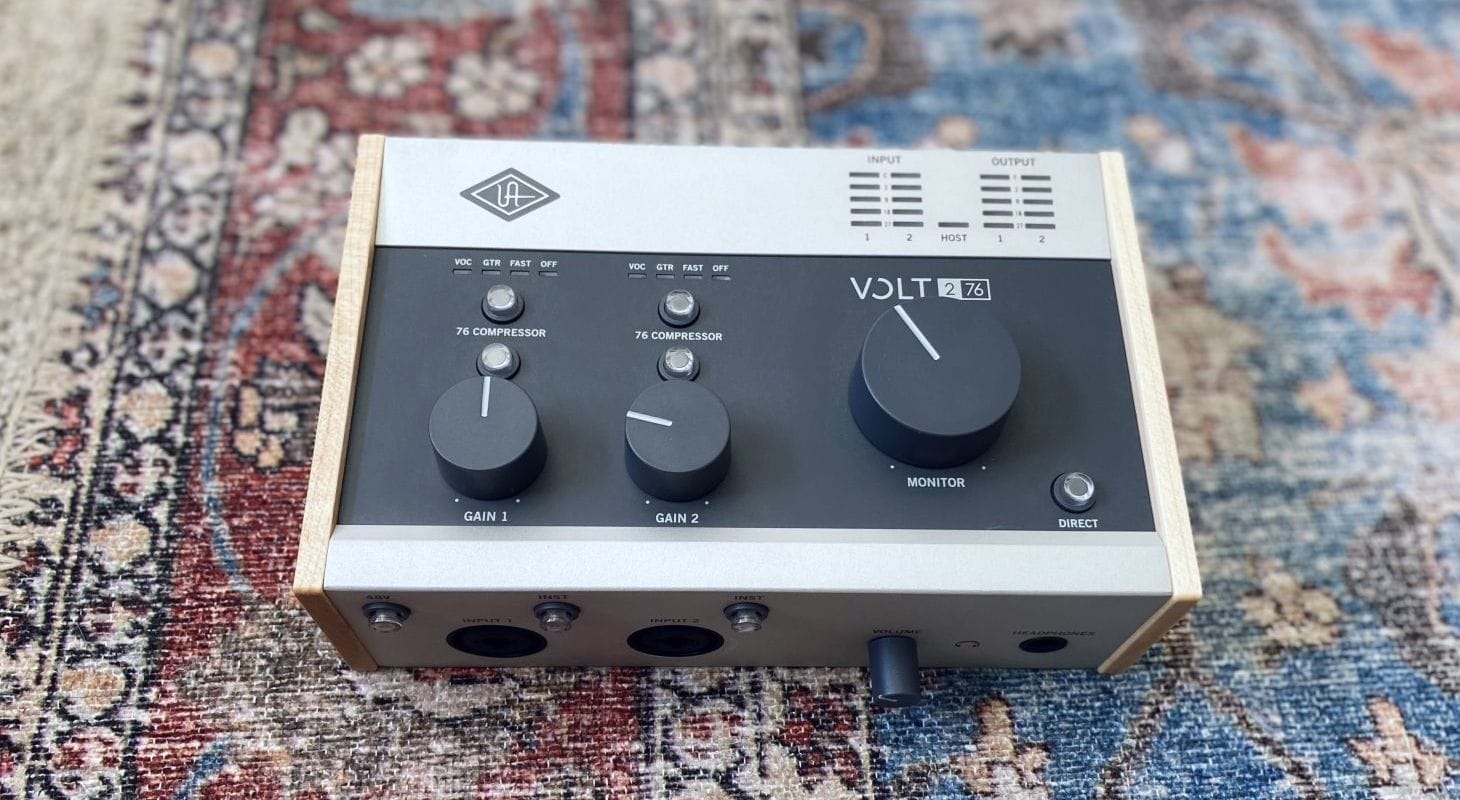
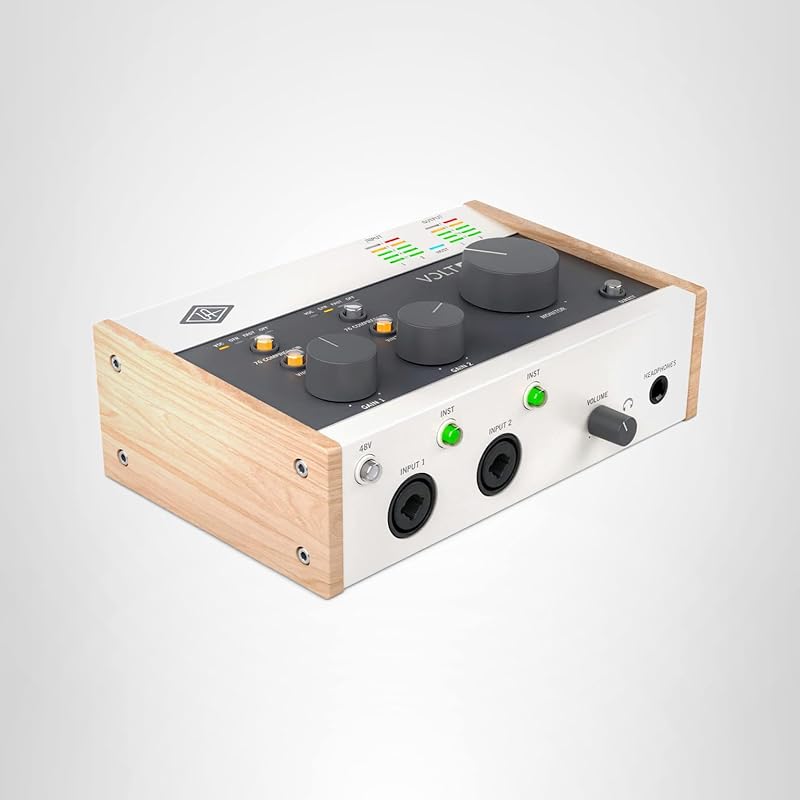
2. Universal Audio Volt 276
The first thing I’m going to say about the Universal Audio Volt 276 is that it’s classy. I just loved the bulkiness of it, and the wooden side panels mixed with the color palette are like traveling in time on board a very modern piece of gear to a beautiful past.
Well, that might be because this interface’s highest selling point is, without a doubt, the inclusion of the analog circuit of UA’s historic 1176 compressor. I don’t want to get ahead of myself here, but these DO make a difference, and a big one.
But first things first, let’s talk about the hardware. To begin with, the 276 comes equipped with two frontal inputs that can accommodate XLR and TRS cables. Both have individual controls for the vintage mode, gain, and the 1176 compressor.
The one thing I didn’t like was that the phantom power engages for both channels at the same time. So, beware if you plug a condenser into one channel and one of those old, super-sensitive ribbon microphones on the other, because harm can be done and tears will be shed.
Another thing I loved was that the unit comes with 22 watts of power for the headphones. I tried running some fancy 600-ohm Sennheiser HD 600s, and they ran smoothly. Speaking of which, the big dial on top is for the monitors out on the back, and the headphones have a dedicated volume at the front.
Finally, the MIDI capability and option to plug an external power source are great details, as is the ON/OFF switch at the back.
But I’ve been delaying the juicy part, let me tell you how it sounds.
I was blown away by how good the vintage mode and the compressor sound. The vintage mode adds a little bump around 1 kHz, some brightness to the high-end, and just a bit of round and beautiful low-end to the signal.
If you couple that with the compressor (set at a 6:1 ratio), you’ll have a great tone to work with immediately. I mean, you just don’t want to turn those two off. The same happened when I plugged in my acoustic and electric guitars, and even a bass and a synth. Everything sounded rounder, fuller, punchier, and livelier.
Perhaps, the only thing I have to say I didn’t like, other than sharing phantom power, is that I would have loved to see a blend control on top of the interface to choose how much of your track and how much of the playback you want to hear.
Other than that, and adding LUNA and all the cool software bundles included in the package, I can’t think of any home studio that won’t benefit from having the VOLT 276 as part of their setup.
Oh, and for those who like connecting all their equipment through MIDI, this interface comes with in and out connections using a 5-pin cable.
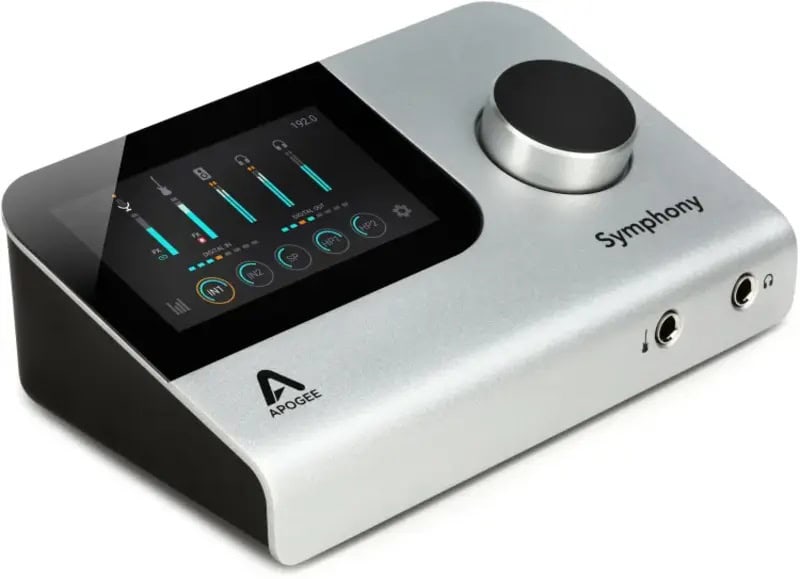
3. Apogee Symphony Desktop
Taking the Apogee Symphony Desktop 10x14 out of the box is like having a glimpse at the future. Yes, it’s space gray, slick, modern, and it comes with a massive touch screen and a huge dial on the top. Is that enough to handle all the power this thing has to deliver? Well, the answer is yes, but let me tell you exactly how.
The first thing I have to say about this unit is that it’s the desktop version of Apogee’s flagship AD/DA converters, coming straight from their elite-level products. We’re talking about their multi-thousand-dollar Symphony I/O line of world-class equipment. Bringing that technology to a desktop interface is nothing short of a groundbreaking achievement.
But that’s just the tip of the iceberg here.
Let’s talk a bit about the hardware. You have two universal inputs in the back along with two balanced TRS outputs, optical ins and outs, two USB ports, the power supply socket, and a headphone out.
I have to say that having the inputs and headphone jack back there is among the most uncomfortable moves I’ve seen in a long time. I mean, you do get a frontal headphone jack, but why not put both there at an easy-to-reach spot along with the microphone connections? I guess it’s the kind of thing you get used to, but at first, it’s kind of annoying.
The front of the unit has headphones out, but also an instrument input (HI-Z) with a TRS jack.
I have to tell you, what I liked the most about this interface is the cleanliness of the audio. With up to 75dB of clean power to work with, you can crank it, and it will remain silent, recording in stealth mode. I also liked the fact that this unit comes with DSP power. I was able to set a channel strip using the provided plugins and print the track through it in real time with zero latency.
It's the closest you can be to working with studio hardware on a desktop unit.
Moreover, you can do what the company calls “dual path” recording, which means hearing the plugins through the monitors as you record, printing the track clean with the plugins you’ve chosen, and adjusting them later on, at the mixing stage.
I left it for the end, but the touch screen is truly something to be appreciated. You could use every feature on this unit from the unit itself without the need for an extra screen. Of course, seeing everything bigger is more comfortable, but I tried tracking with it inside the studio while everything else was in the control room, and it was one of the best experiences I’ve had with desktop interfaces.
That said, perhaps a caveat for old-school cats like me is the lack of buttons and dials. I like those; I prefer those to a touch screen. But that’s just my taste.
You might have seen it in the price tag: this is not an entry-level, beginner-oriented piece of gear. On the contrary, it can power an entire studio with optical ins and outs, adding 10 inputs and 14 outputs in total.
So, if you’re after state-of-the-art recording equipment that can fit inside a laptop bag, you have to give the Symphony a try. For something more home-studio, amateur-oriented interface, you should keep looking.
Oh, and if you want the amazing Apogee sound but in a more portable and affordable package, try the Apogee Duet 3 2x4.
4. Focusrite Scarlett 2i2 4th Gen
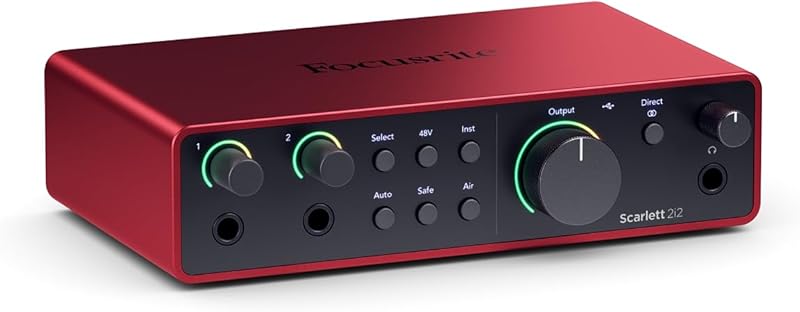
Let me say that the price range in which this 2i2 4th Gen competes is a crowded space. Most companies, big and small, have a device around this price and with similar features. The competitive advantage for Focusrite was getting there early and listening to their customers.
Yes, the Focusrite Scarlett 2i2 4th Gen comes equipped with user-friendly features that make the workflow easier and more streamlined. I mean, if you’re a 3rd Gen owner, you probably won’t find a good enough reason to spend your hard-earned money on this upgrade. But if it’s your first, you’re arriving at a great moment.
First off, I love the halo light that doubles as a gain meter and a vu-meter for your signal around the gain knobs. It’s kind of annoying selecting which of the inputs you’re trying to affect, but it saves precious real estate. This thing is small.
That’s the section where you’ll find some of the new features. I just loved the air button. It comes with two very usable settings. The first is kind of a high-frequency boost that’s great to add clarity and brightness to any source. The second is called air + drive and is scooped in the mids while pushing lows and highs up. This is ideal to clean up vocals and give your bass that rocking sound. However, I found it kind of useless on acoustic instruments. That said, it’s one of those things that you don’t want to turn off while you’re using a dynamic or a condenser microphone.
Speaking of which, this interface has some serious preamp gain, enough to drive a dynamic microphone like the Shure SM7B to overdrive at full gain. I tried it with a much more modest SM58, too, and the result was a good, punchy, quintessential Shure sound with no extra juice added. Likewise, the auto gain adjustment is great for a set-it-and-forget-it approach to sources like synthesizers or anything that’s kind of steady and continuous. For dynamic sources, it’s kind of useless.
What I didn’t like one bit was the safe mode. This is because instead of kicking in a limiter to help you stay below 0 dB, it just lowers the input gain. The thing is, it doesn’t push it back up. This means that, if it’s activated while you’re screaming in the chorus, the gain will still be low when you embark on the melodic verses.
The 48 volts of phantom power apply to both inputs at the same time when engaged. Being a beginner-oriented interface, I don’t think you’ll connect a fragile ribbon microphone along with your condenser. If you do, beware.
Regardless of me not liking the rear inputs for the microphones, I have to say design and feature-wise, this is everything you need to get started, and if you’re a hobbyist, it’s all you need to have endless fun.
Plus, it comes with a software bundle including two DAWs and the Hitmaker Expansion, which is packed with plugins that go from the Melodyne for vocals to the XLN Audio Addictive Drums 2.
In this price range, this audio interface is hard to beat.
5. Solid State Logic SSL 2+ MKII
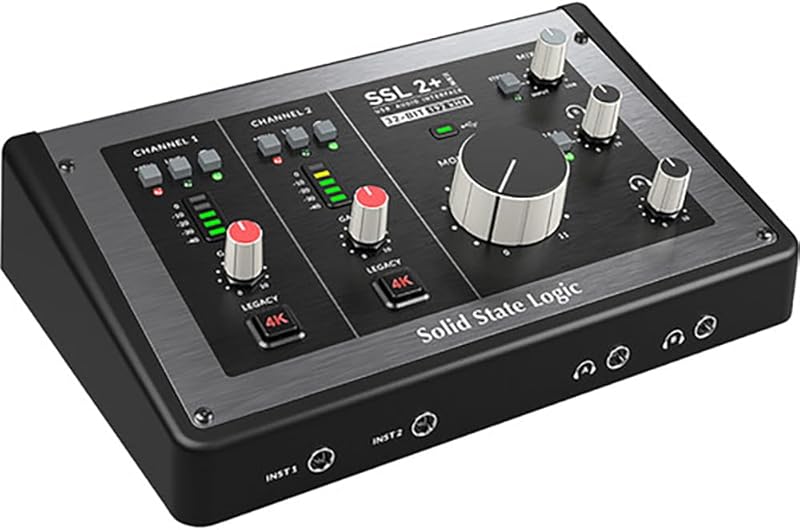
The first thing I have to say about the Solid State Logic SSL 2+ MKII is wow, what a sound! I mean, unless you’ve been living under a rock for the past few decades, you’ll know that Solid State Logic makes some of the best pro audio equipment used in recording studios around the world. Well, the second iteration of their groundbreaking audio interface is just as good as you’d expect from such a brand.
Even without the Legacy 4K option engaged, this thing sounds amazing, especially for vocals.
But let’s start from the beginning, shall we? The first thing that hits you is that this thing is big for its price range. It takes a lot of desktop real estate. I loved the fact that SSL moved the inputs for the headphones to the front of the unit. This made everything much easier than with the MKI version. The same goes for the separate instrument inputs on the front. At the back, Neutrik jacks allow XLR and TRS connections, while the 4 TRS outputs in the back allow you to connect up to four monitors.
Believe me, I tried it, and it worked like a charm. You can even send a separate mix to each. Imagine sending different mixes to the band and the control room at the same time. I know, awesome. Likewise, you have two headphone inputs with dedicated volume knobs and the ability to send each a different mix.
On top of that (physically), you’ll find the blend control that allows you to dial in exactly how much of the background and how much of the performance you want in the final mix, which can also be stereo.
We tried stereo microphone placement, and hearing the stereo image through the headphones is an experience.
As for the sounds, the 4K Legacy comes from the acclaimed, legendary SSL 4000 consoles and adds a little analog flavor and harmonic distortion to the sound. The minimum needed to add character and color to the sound without breaking it too much.
Applied to a dynamic microphone like the SM7B, you’ll feel the grain and how it opens the sound at the top end. With a regular condenser, you’ll find it works by adding brightness and tightening the body. Plus, with the high-pass filter available, you can just leave out the low rumble that’s prone to making your mix muddy.
I loved the separate phantom power per input but didn’t like the vu-meter. I mean, going 10 in 10 for dBs is kind of useless. I want to see, at least, the yellow and red with a little more room to operate upon them.
Finally, it comes with a bundle packed with everything needed for production right from moment zero.
For those in search of a superb-sounding, very capable, and versatile audio interface that won’t break the bank and will deliver above its price, this is a strong candidate.
6. MOTU M4
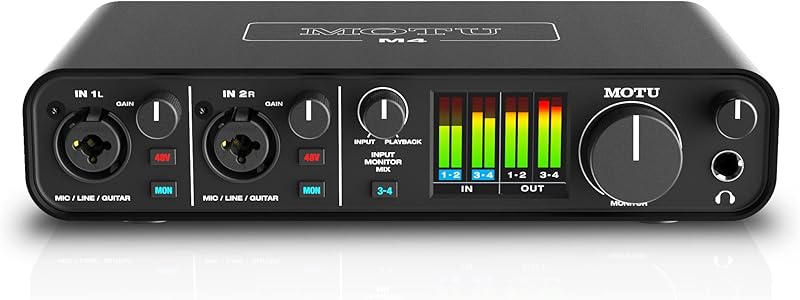
The MOTU M4 might be small in size, but don’t let that fool you; it’s packed with features. I mean, some of the user-friendly decisions MOTU made while designing the MOTU M4 should be replicated by other manufacturers. They’re very, very smart and I’m sure have heard many customers.
To begin with, the controls for each channel are just awesome. You can not only select 48-volt phantom power on each channel, but you can also select which one you’re hearing through the monitors.
This is groundbreaking for someone like me who has been fighting for decades not to hear the guitar on the monitors while recording it at a decent gain level when recording guitar and vocals.
With the M4, you can just press the MON button, and that’s it; the guitar is gone from the speakers while the voice rings loud and clear.
I also loved the blend knob for monitoring. You can easily dial more of yourself and less of the playback or vice versa. So, when recording acoustic guitar with vocals, you can just set how loud the metronome will be without affecting gain levels.
Next, we have to talk about the meters on the screen. I mean, don’t get me wrong, I love old-school vu-meters too, but it’s so detailed, and it moves in real time; it’s just super helpful.
The M4 also has a stereo line-in input for channels 3 and 4, where I plugged my Korg Microkorg and got an amazing stereo sound that was easy to process later on.
As for outputs, this unit has a 4x4 architecture, which means you get four outputs. These are distributed in a very smart way. You get four regular monitor outputs, but, in addition, you get another RCA monitor output, which means you can send the output to a different type of device or monitor.
However, that’s not all, because they also designed this with the podcaster or streamer in mind. You get an RCA line out, too, so you can go back to your computer in a loop and stream whatever’s coming out of the computer along with what’s going into the interface.
Finally, let’s talk about the audio quality. I know, it doesn’t come with any legendary preamp coloring to give more character to the sound. However, to be honest, I didn’t miss it. The sound is so modern, clean, and bright that it’s a perfect match for dark microphones like the SM7B but also for condensers. Moreover, it’s a good start to sculpt tone with the included software bundle.
Speaking of which, this unit comes with everything you need software-wise to get started right away, but it also comes with 6 gigabytes of samples you can use to build your own tracks.
So, if you want a very easy-to-use and versatile interface that sounds great, won’t break the bank, and will deliver consistently, this one is worth checking out.
The Bottom End
Getting started with my production journey; I bought a very tiny and amazing M-Audio Fast Track interface. Soon after, I made my first solo record in my apartment. After that, I went on a 9-month trip through Southeast Asia, and it came with me all the way. I still use it at home for early demos of songs.
Yet, the moment I stepped out of that comfort zone, I was blown away by the sound difference. Plus, the features evolved so much, the workflow with modern units is seamless; intuitive almost.
These are the best desktop audio interfaces on the market right now. They will help you start your journey, up your game, and reach your wildest dreams.
Pick wisely and make great music.
Happy recording!
